|
Last Site Update: August 18th, 2026 | Latest Version: 13.1.0 |
|
|
|
|
|
|
|
|
|
|
|
|
|
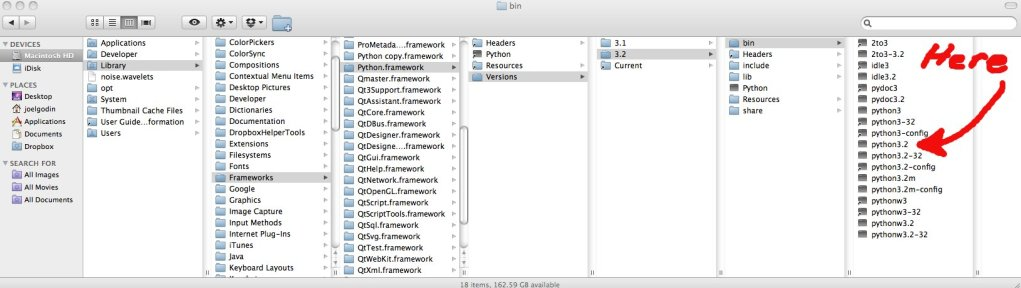
Configure InterpreterAfter installing it, the first thing you must do is configure the Python and/or Jython and/or IronPython interpreter. 1. Go to: window > preferences > PyDev > Interpreter - (Python/Jython/IronPython). 2. Choose the interpreter you have installed in your computer (such as python.exe, jython.jar or ipy.exe). Note that the Auto Config will try to find it in your PATH, but it can fail if it's not there (or if you want to configure a different interpreter). On Windows it'll also search the registry and provide a choice based on the multiple interpreters available in your computer (searching in the registry). On Linux/Mac, usually you can do a 'which python' to know where the python executable is located. On Mac it's usually at some place resembling the image below (so, if you want to configure a different version of the interpreter manually, that's where you'd want to search):
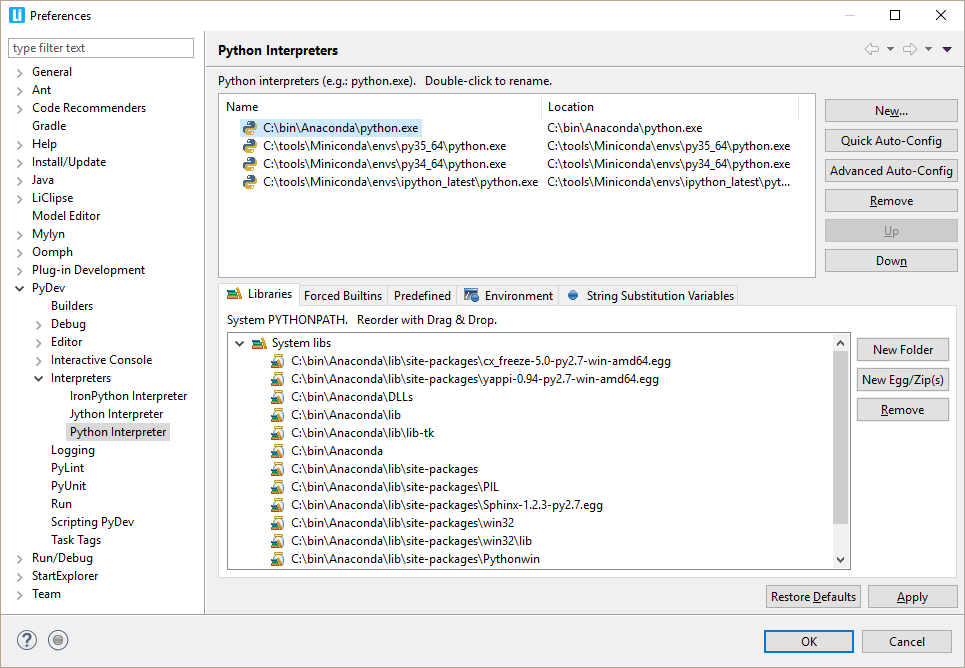
IMPORTANT: Select only folders that will NOT be used as source folders for any project of yours (those should be later configured as source folders in the project). IMPORTANT for Mac users: The Python version that usually ships with Mac doesn't seem to have the .py source files available, which are required for PyDev, so, using a different interpreter is recommended (i.e.: Download it from http://python.org). If you don't want to use a different interpreter, get the source files for the Python /Lib folder and add those to the system installation. After those steps, you should have a screen as presented below:
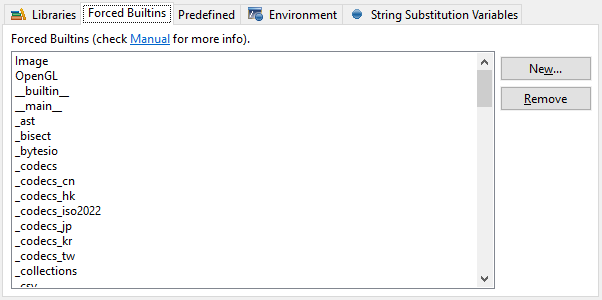
How to check if the information was correctly gottenThe System libs must contain at least the Lib and the Lib/site-packages directory. The Forced builtin libs must contain the modules built into the interpreter (and others whose How to work with virtual environments (virtualenv, conda, etc)For PyDev, a virtual environment works as any other regular Python executable, so, just click the New... button and select the Python executable in the virtual environment -- just take care to double check the folders which are selected when the virtual environment executable is used to make sure that you leave checked the /Lib folder from the base interpreter if the virtual environment inherits the PYTHONPATH from a base installation). venv is the recommended way of managing virtual environments starting from Python 3.5. By default, venv will only symlinks to Python interpreter, and this will cause the pip of the created virtual environments in Pydev showing all system installed site-packages. To get it displayed correctly, you will need to append "--copies" to the "python3 -m venv /path/to/venv" What if it is not correct?The most common error is having a problem in the environment variables used from the shell that spawned Eclipse, in a way that for some reason when getting the variables of one interpreter, it gathers the info from another interpreter (thus mixing the interpreter and the actual libraries). Usually running (from the command prompt) the file that gives that info for PyDev can help you discovering the problem in your configuration (interpreterInfo.py): That file is usually located at: eclipse\plugins\org.python.pydev_$version$\pysrc\interpreterInfo.py, but it can be at other location depending on how you installed it ) In Python: python.exe interpreterInfo.py In Jython: java.exe -cp c:\path\to\jython.jar org.python.util.jython interpreterInfo.py In IronPython: ipy.exe interpreterInfo.py If you're unable to find out what's going on, please open an issue in the tracker (https://www.brainwy.com/tracker/PyDev (giving the output obtained from executing interpreterInfo.py in your machine). What if I add something new in my System PYTHONPATH after configuring it?Since PyDev 3.0, such modifications should be automatically detected by PyDev and require no further steps (so, if you pip-installed something or manually added it to a folder which is already in the PYTHONPATH -- such as Lib/site-packages -- just wait a bit and PyDev should start considering it in code-analysis and code-completion). LibrariesThe System libs are the libraries that will be added to the PYTHONPATH of any project that is using this interpreter. For Python and IronPython, it's composed of folders, zip files and egg files. Note that if dlls should be added to the PYTHONPATH, the folders actually containing those dlls should be added, and they must have the same name to be imported in the code (the case is important). I.e.: if you want to import myDllModule, it must be called myDllModule.dll (note that .pyd and .so extensions are also accepted). For Jython, it's composed of folders and jars. Forced BuiltinsThe Forced builtin libs are the libraries that are built-in the interpreter, such as _builtin_, sha, etc or libraries that should forcefully analyzed through a shell (i.e.: to analyze modules in this list, PyDev will spawn a shell and do a dir() on the module to get the available tokens for completions and code-analysis) – still, sometimes even that is not always possible, in which case, Predefined Completions may be used to let PyDev know about the structure of the code. For Python, you should have around 50 entries For Jython around 30 entries. For IronPython more than 100 entries. All the packages built into .NET should be included here – e.g.: Microsoft, Microsoft.Windows.Themes, System, System.IO, etc. Additionally, you may add other libraries that you want to treat as builtins, such as os, wxPython, OpenGL, etc. This is very important, because PyDev works on the java side only with static information, but some modules don't have much information when analyzed statically, so, PyDev must create a shell to get information on those. Another important thing is that they must be on your System PYTHONPATH (otherwise, the shell will be unable to get that information).
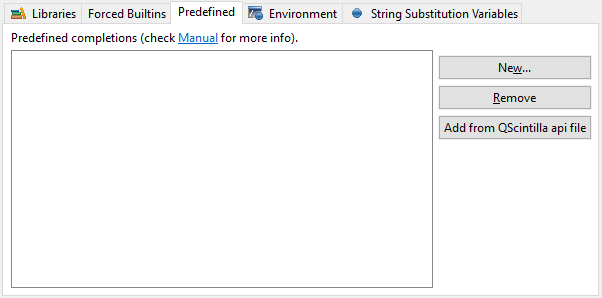
Predefined CompletionsPredefined completions are completions acquired from sources that provide only the interfaces for a given Python module (with Python 3.0 syntax). A predefined completion module may be created by having a module with the extension .pypredef with regular Python 3.0 contents, but with attributes having assigns to its type and methods having as the body a sole return statement – and the docstring may have anything. Example for a my.source.module (must be declared in a my.source.module.pypredef file): MyConstantA = int
MyConstantB = int
class MyClass:
instanceAttribute = QObject
def __init__(self, parent=None):
'''
@type parent: QObject
'''
def registerTimer(interval, object):
'''
@type interval: int
@type object: QObject
'''
return int
Note 1: the name of the file is the exact name of the module Note 2: .pypredef files are not searched in subfolders Optionally a QScintilla .api file may be added. When this is done, PyDev will try to create .pypredef files from that .api file and will add the folder containing those to the PYTHONPATH. Note that this conversion is still in beta and the file may not be correctly generated, so, keep an eye for errors logged when a code-completion that would use those modules (while it will not fail, those completions won't be shown using the .pypredef files). In those situations, please create a bug-report with the .api file that generated incorrect code.
EnvironmentThe variables defined at the environment will be set as environment variables when running a script that uses the given interpreter (note that it can still be overridden in the run configuration) String substitution variablesStrings defined here may be used in:
They can be used in those places in the format: ${DECLARED_VARIABLE} Cygwin usersPyDev currently has no support for cygwin. Currently you'll be able to configure the interpreter with cygwin, but there are still other related problems (mostly on converting between windows and cygwin paths as needed).
|
PyDev developmentPyDev is open source and depends on your contributions! This may be in the form of bug fixes, answers on stackoverflow, new features...Another option is financially supporting it at: Patreon (which provides a way to support it monthly and get rewards starting with $1). 
Or through 1-time contributions at: Paypal 

Search PyDev-related content |
|
|
|
|
Copyright: Brainwy Software Ltda, 2014-2025 |